Canva Frame Tote Bag Templates: Your Shortcut to Pro Designs
There’s a specific kind of frustration that hits when you have a brilliant idea for merchandise but zero technical ability to execute it. You want to launch a custom tote bag line for your boutique, or maybe you need branded swag for a trade show, but the thought of wrestling with complex vector software makes you want to quit before you start. This is exactly where the utility of Canva Frame Tote Bag Templates shines. These aren't just static images; they are functional design assets that bridge the gap between professional mockups and accessible design tools. By leveraging Canva's native "frame" technology, these templates allow you to wrap your artwork around a 3D tote bag shape instantly, giving you a realistic preview of your final product without needing a degree in graphic design.
Mastering the "Frame" Functionality
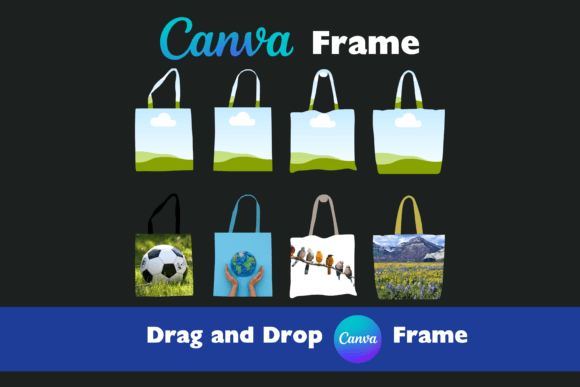
If you are used to the standard drag-and-drop interface of Canva, using these templates will feel like second nature, but the results are far more sophisticated. The core mechanism relies on Canva's grid and frame features. Essentially, the tote bag template acts as a mask. You upload your high-resolution artwork—whether it’s a hand-lettered logo, a digital illustration, or a striking photograph—and simply drag it into the designated frame area on the template. The software automatically crops and scales your image to fit the bag's dimensions perfectly. This process removes the guesswork regarding bleed areas and safe zones. You see exactly how the design sits on the fabric in real-time. If the composition feels off, you can double-click the image to reposition it within the frame, ensuring the focal point of your design is exactly where you want it to be.
The Strategic Advantage of Separate Handles
One of the most overlooked aspects of tote bag design is the handle. It is often treated as an afterthought, but it plays a massive role in the final aesthetic. This is where these specific templates offer a distinct creative edge. Unlike standard mockups where the bag is a single, unchangeable unit, these templates feature separate handles. This modularity is a game-changer for brand strategists and small business owners. It allows you to experiment with contrast and color theory without altering your main artwork.
Imagine you are designing a bag for a coffee shop. You might have a dark roast logo that looks great on a cream canvas, but what about the handles? Because they are separate elements, you can easily toggle them to a deep espresso brown to match the brand’s secondary palette, or perhaps a vibrant teal for a pop of modern color. This flexibility allows you to explore different personality traits for the product. A black handle might convey urban sophistication, while a raw cotton handle suggests an eco-friendly, bohemian vibe. This level of customization ensures that the final product aligns perfectly with your brand identity, making the design process both strategic and playful.
Applications for Entrepreneurs and Creatives
The utility of Canva Frame Tote Bag Templates extends well beyond simple merchandise planning. For entrepreneurs and marketers, these templates serve as powerful visual aids for pitch decks and social media content. Instead of showing a client a flat, two-dimensional logo file, you can present it on a realistic product. This contextualization helps stakeholders visualize the potential of the brand in the real world. It answers the question, "How will this look on physical goods?" before a single cent is spent on manufacturing.
For bloggers and content creators, the templates are ideal for creating lifestyle imagery. You can mock up a tote bag featuring your blog's graphics to use as a prop in a flat-lay photo, or create promotional graphics for a giveaway without needing to order a physical sample. Crafters and hobbyists can use them to plan custom gifts, ensuring that a birthday design or family reunion graphic looks balanced and legible on the bag's surface. The high-quality nature of the files ensures that even when zoomed in for a social media close-up, the image remains crisp and professional.
Technical Specs and Workflow Integration
Quality is non-negotiable when it comes to design assets. These templates are delivered as PDF files containing high-resolution images, ensuring that the texture of the tote bag fabric looks authentic. Crucially, they come with no watermarks. This is vital for commercial use, allowing you to use the final mockups on your website, in your Etsy listings, or in client presentations without distracting branding overlays.
The workflow is designed to be frictionless. Once you download the file, you upload it directly into Canva. There is no need for third-party conversion software. Once inside the editor, the world of modern typography and Canva’s vast library is at your disposal. You can pair your imagery with a premium font to add a slogan to the bag. Whether you prefer a sans serif font for a clean, corporate look or a script font for something more artisanal, you can test these font pairings directly on the mockup. This allows you to check readability and visual hierarchy instantly. Can you read the text from a distance? Does the display font overpower the logo? You can answer these questions immediately.
Elevating Your Brand Perception
Using high-quality mockups influences how your audience perceives your brand. A flat image on a screen can sometimes feel abstract, but a well-rendered 3D mockup conveys professionalism and attention to detail. When you use Canva Frame Tote Bag Templates, you are signaling to your audience that you care about the tangible experience of your brand. This consistency across your digital presence builds recognition and trust.
Whether you are working on packaging design, editorial design, or web design