Editable Paddle Fan Canva Templates for Instant DIY Projects
Creating functional, beautiful event materials shouldn't require a design degree or a massive budget. For anyone planning a wedding, memorial, graduation, or community gathering, the challenge is often finding a way to produce personalized items that feel polished without spending weeks on production. This is where a practical resource like Editable Paddle Fan Canva Templates changes the game. It's not just a digital file; it's a complete production system for a specific, tangible product.
What Exactly Are These Paddle Fan Templates?
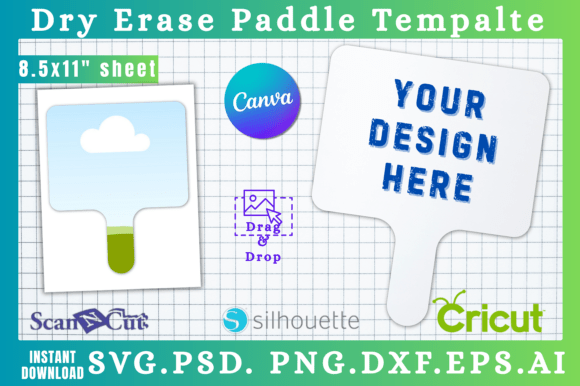
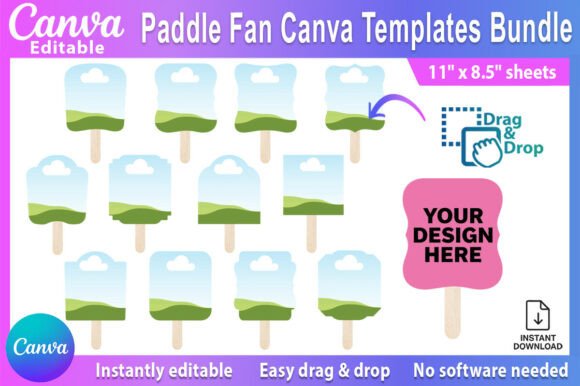
At its core, this is a Canva template bundle designed to create printable paddle fans. You receive a PDF with a link that opens directly in your free Canva account. The templates are pre-sized at 6.5″x7.25″ for the fan itself, laid out on standard 11″x8.5″ printable sheets. The visual style is clean and modern, built for customization. Think of them as a flexible design asset—the structure is provided, but the creative direction is entirely yours. The personality is professional yet approachable, ensuring the final product looks intentional, not like a last-minute craft project.
The appeal lies in the drag & drop photo layout. You're not starting from a blank canvas. Instead, you're guided by a framework where photos, text, and decorative elements have designated spaces. This is crucial for maintaining visual hierarchy and readability. A well-designed template ensures that the guest of honor's photo is the focal point, the event details are clear, and the overall composition is balanced, even for someone without formal design training.
Practical Applications Beyond the Obvious
While the primary use is for events, thinking of these templates only as "party favors" limits their potential. For a small business owner or entrepreneur, they become a unique marketing tool. Imagine a local brewery creating branded fans for a summer festival, with a QR code for a discount. A real estate agent could use them at an open house in a warm climate, featuring the property listing and their contact information. The fan becomes a functional piece of brand identity that people keep and use.
For marketers and content creators, the process itself offers valuable insight into efficient print design. Working within a template teaches the importance of margins, bleed, and how digital designs translate to physical objects. It's a hands-on lesson in packaging design principles, applied to a simple, everyday item. The constraint of the fan shape forces creative problem-solving with space, which is a skill applicable to social media graphics and editorial design.
Making the Template Work for Your Brand
The real power of Editable Paddle Fan Canva Templates is unlocked when you align them with your existing aesthetic. This is where understanding font pairing and color theory becomes practical. Canva provides a library of serif fonts, sans serif fonts, and script fonts. A memorial fan might pair a dignified serif font for the name with a clean sans serif for dates. A birthday party fan could use a playful handwritten font for the headline and a simple sans serif for details.
Consider the typeface choices as part of the fan's personality. A modern typography approach with a geometric sans serif font feels contemporary for a graduation. A delicate script font adds elegance to a bridal shower. The goal is consistency with your other materials. If your wedding website uses a specific premium font style, you can often find a close match within Canva's offerings to maintain a cohesive brand identity across all touchpoints.
A Step-by-Step Approach to Customization
- Start with the Content: Before opening Canva, gather your high-resolution photos and finalize all text. Know the exact event date, time, and location. This prevents the common pitfall of designing with placeholder text and missing errors.
- Open and Explore: Click the template link in the PDF. Take a moment to study the layers and groups in Canva. Understand which elements are movable text boxes versus decorative graphics.
- Customize Systematically: Replace the placeholder photo first. Adjust the photo crop within its frame. Then, change the text, focusing on readability. If the pre-set font size is too small for a hand-held fan, increase it. Test the contrast between text and background color.
- Evaluate the Whole: Step back. Does the visual hierarchy guide the eye naturally? Is the most important information—the "what" and "when"—immediately clear? Does the color palette feel right for the event's tone? This is where you apply design thinking to refine the composition.
- Prepare for Print: Download the design as a PDF Print file. Before sending to a home printer or a professional service, print a test sheet on regular paper. Check for alignment and color accuracy. The template's printable 11″x8.5″ sheets format is designed for standard printers, but a test run saves time and materials.
Considering the Practical Details
One of the most significant advantages of this system is the elimination of software barriers. Canva is a free, web-based design tool that democratizes creation. There's no need for an Adobe Creative Cloud subscription or knowledge of complex software. This makes it accessible for hobbyists, crafters, and volunteer committees who are managing event logistics alongside their daily jobs.
From a production standpoint, the template handles the technical specs. The printable formats include crop marks and are set to the correct resolution for home printing. For larger quantities, you can easily send the file to an online print shop. The flexibility to produce one fan or one hundred, instantly, is a major logistical benefit for event planning.
Ultimately, these templates are a bridge between a digital idea and a physical keepsake. They provide the professional structure so you can focus on the personalization that makes an event meaningful. Whether you're creating a funeral keepsake fan with a cherished photo or bridal shower decor that matches the wedding colors, the value is in the combination of professional design and personal touch. It turns a simple DIY project into a polished, memorable part of the occasion.